Business guide
How to Calculate EMI and Compare Total Loan Interest

Updated · 6 min read
A monthly instalment tells you what leaves your account each month, but it does not reveal the full cost of borrowing. A longer term can make the EMI easier to manage while increasing the interest paid over the loan's life. To compare options, keep the amount borrowed and interest method consistent, then examine the monthly payment and total repayment together. This guide uses a simple fixed-rate, reducing-balance example and the FilesConverter.in EMI Calculator. It also explains which costs and real-world changes sit outside that estimate.
Quick reference
| Term | Approximate EMI | Total interest | Total repayment |
|---|---|---|---|
| 12 months | Rs 8,884.88 | Rs 6,618.55 | Rs 1,06,618.55 |
| 24 months | Rs 4,707.35 | Rs 12,976.33 | Rs 1,12,976.33 |
1. Start with the amount actually being financed
Open the EMI Calculator and enter the principal in Loan Amount. Use the sum being financed, rather than the purchase price before a down payment. For example, a Rs 1,50,000 purchase with Rs 50,000 paid upfront leaves a Rs 1,00,000 principal if no other costs are added to the loan.
Check how fees and insurance are handled in the lender's quote. A charge paid upfront affects your overall cost but does not automatically belong in the financed principal. A charge added to the loan may increase the amount on which interest is calculated. The tool has no separate fee fields, so keep a separate record of costs outside the amount you enter.
2. Confirm that the interest rate uses a reducing balance
Enter the annual percentage in Interest Rate (% per annum). For a stated annual rate of 12%, enter 12, not 0.12 or the monthly rate of 1. The calculator converts that annual input into a monthly rate by dividing by 12 and 100. Its formula assumes interest is charged on the balance still outstanding.
A flat-rate quote uses a different basis and cannot be compared by entering the same percentage here. Under a simple one-year flat 12% example on Rs 1,00,000, interest would be Rs 12,000 on the original principal. The reducing-balance example produces approximately Rs 6,618.55 interest. Ask the lender which method its quoted percentage represents before using the two figures in a comparison.
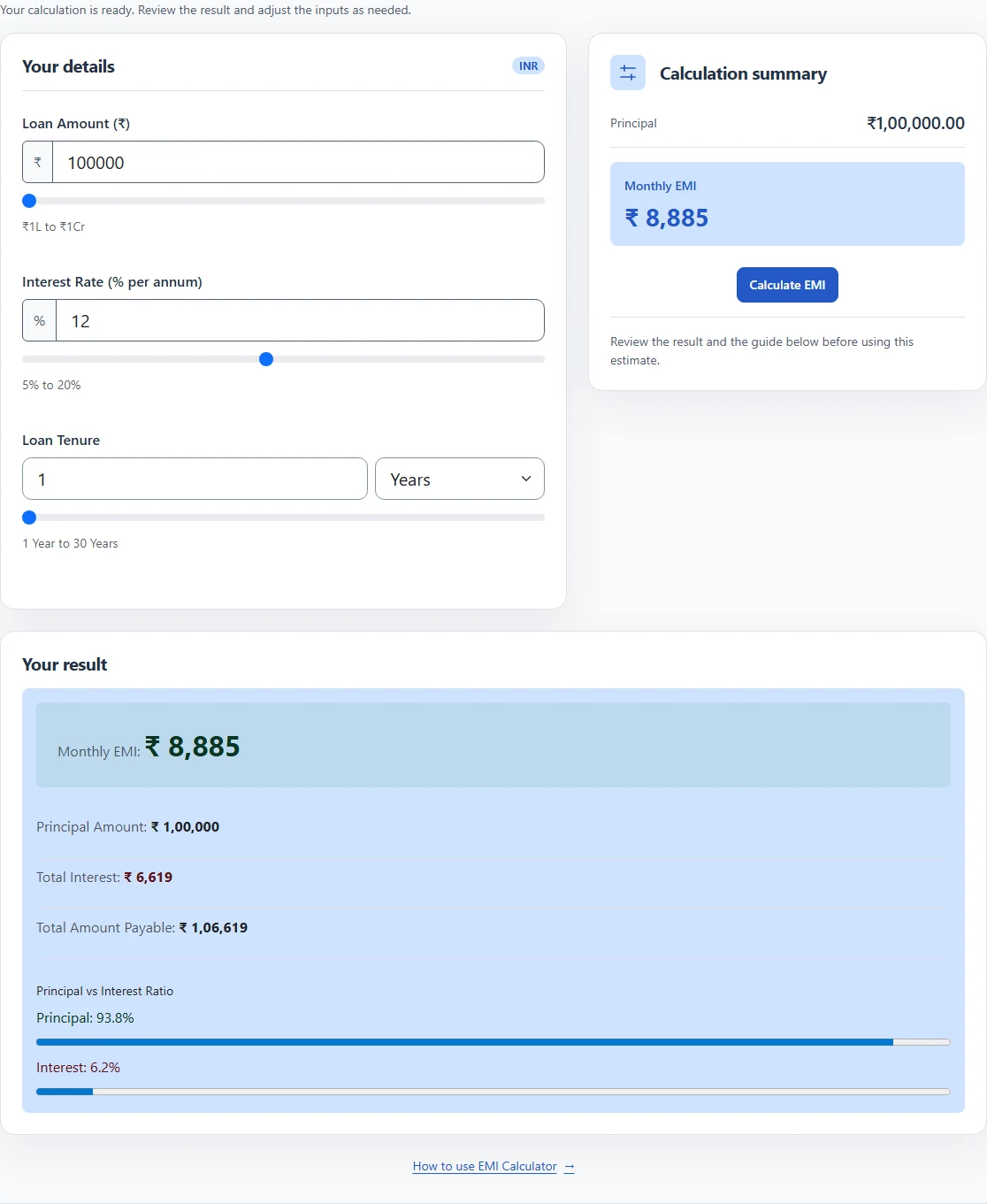
3. Choose the repayment period and check the unit
Enter Loan Tenure and select Years or Months. One year and twelve months describe the same repayment period; twelve years describe a very different loan. The tool's slider is convenient for broad adjustments, while the number field lets you enter the term directly. Always reread the selected unit after changing it.
For the worked example, use a Rs 1,00,000 loan, 12% annual interest, and one year. Select Calculate EMI. The formula uses twelve equal monthly payments and a constant rate. It does not model an irregular first payment date, a payment holiday, a changing interest rate, or an extra repayment made partway through the term. Those features require a more detailed lender schedule.
4. Read monthly EMI, total interest, and total repayment together
The estimate is approximately Rs 8,884.88 per month, Rs 6,618.55 total interest, and Rs 1,06,618.55 total repayment. The tool displays rounded whole-rupee figures, so its monthly result is about Rs 8,885. Multiplying that displayed rounded EMI by twelve can differ slightly from the separately rounded total because the calculation retains more precision internally.
The underlying formula is EMI = P × r × (1 + r)^n / ((1 + r)^n - 1), where P is principal, r is the monthly rate as a decimal, and n is the number of payments. Total repayment is the calculated EMI multiplied by n, and total interest is repayment minus principal. The principal-and-interest display helps show how much of the total is borrowing cost.
5. Compare another term and check the budget impact
Keep the example amount and rate unchanged, then use two years. The estimated EMI falls to about Rs 4,707.35, but total interest rises to about Rs 12,976.33. That is approximately Rs 6,357.79 more interest across the longer term, despite the smaller monthly payment. Record both cases with their fees before deciding which fits your situation.
Compare the payment against regular expenses, existing repayments, and the cash you need for unexpected costs. For a floating-rate offer, calculate an additional case using a higher rate to understand the possible pressure; this is a scenario, not a forecast. The Loan Calculator provides a repayment schedule for a closer look at how principal and interest change over time.
Reconcile the estimate with the lender's written offer
A useful comparison records the same facts for each offer: financed amount, interest basis, annual rate, number of payments, instalment amount, upfront charges, and total payable. Also check whether quoted insurance or service costs are optional, financed, or paid separately.
- Ask about rate resets, processing charges, and prepayment conditions where relevant.
- Compare the repayment schedule if the first or last instalment differs from the regular payment.
- Do not treat a low monthly instalment as evidence that a loan is affordable or approved.
- Keep fees outside the interest total visible when assessing overall cost.
The current EMI tool requires a positive rate and does not provide a valid zero-interest calculation. For a genuinely zero-rate arithmetic example, divide principal by payment count yourself, then add any separate charges to the cost comparison. Confirm actual payment terms with the lender.
Frequently asked questions
Does a lower EMI mean I pay less interest?
Not necessarily. With the same principal and positive reducing-balance rate, spreading payments over a longer term usually lowers the EMI while increasing total interest. Compare total repayment and fees alongside the monthly amount, using the same interest method for each offer.
Why is the lender's EMI slightly different from this result?
The lender may use different rounding, payment dates, financed charges, or interest accrual rules. Check that the principal, annual rate, term, and interest basis match first. Then compare its written repayment schedule, especially the first and final payments.
Does the total interest include processing fees or insurance?
No separate fees or insurance inputs are included. Total interest is the modelled repayment minus the entered principal. If a charge is financed within that principal, it can affect the EMI, but the calculator does not separately identify that charge or its tax treatment.
Can the calculator predict savings from making an early repayment?
The EMI tool has no dated prepayment input. Early repayment savings depend on when money is paid, the remaining balance, lender rules, and any applicable charges. Ask for a revised lender schedule rather than subtracting a lump sum from the original interest total.
Found a step that needs updating? Contact Alok Kumar Sharma with the guide title and a description of the issue.